PhysiCalc: Scientific Calculat
Publisher Description

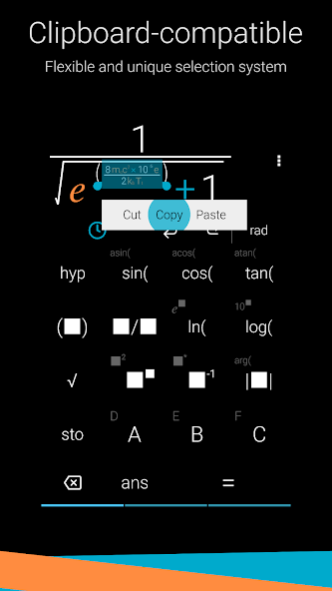
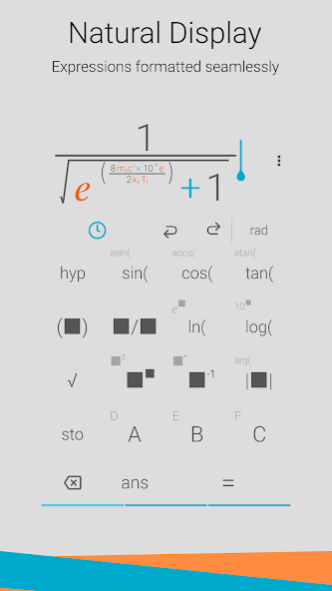
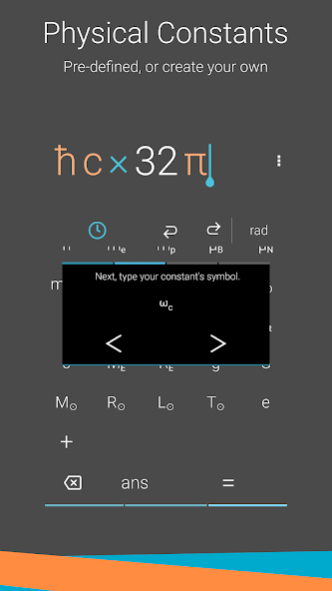
PhysiCalc is an ad-free scientific calculator aimed at students and scientists working in the physical sciences, although anyone can use it. In a beautifully uncluttered user interface, it offers many different scientific functions, as well as fraction and indices features like those you might find on a physical calculator. You can also define and use your own constants in calculations, and 30 standard constants have been included to get you started.
KEY FEATURES:
+ Clean, clear and intuitive user interface
+ Tap the screen or use volume buttons to move the cursor
+ Copy, cut and paste expressions to and from the calculator
+ Undo and redo functions to step back and forward through calculations
+ Just like a physical calculator, input fractions and indices as they would be written on paper, with the numerator above the denominator
+ Access to many standard scientific functions
+ Supports complex numbers
+ Ability to store and recall results in up to 6 memory buttons
+ Choose from a range of significant figures to display your result
+ Insert physical constants into your equations: pick from 30 included constants and even add your very own
+ Shake your device to generate a random number or clear the screen
+ Choose between radians and degrees for trigonometric functions
About PhysiCalc: Scientific Calculat
The company that develops PhysiCalc: Scientific Calculat is Ollie Beeke. The latest version released by its developer is 1.0 .
To install PhysiCalc: Scientific Calculat on your Android device, just click the green Continue To App button above to start the installation process. The app is listed on our website since 2020-05-31 and was downloaded 6 times. We have already checked if the download link is safe, however for your own protection we recommend that you scan the downloaded app with your antivirus. Your antivirus may detect the PhysiCalc: Scientific Calculat as malware as malware if the download link to com.olliebeekeappsgmail.physicalc is broken.
How to install PhysiCalc: Scientific Calculat on your Android device:
- Click on the Continue To App button on our website. This will redirect you to Google Play.
- Once the PhysiCalc: Scientific Calculat is shown in the Google Play listing of your Android device, you can start its download and installation. Tap on the Install button located below the search bar and to the right of the app icon.
- A pop-up window with the permissions required by PhysiCalc: Scientific Calculat will be shown. Click on Accept to continue the process.
- PhysiCalc: Scientific Calculat will be downloaded onto your device, displaying a progress. Once the download completes, the installation will start and you'll get a notification after the installation is finished.
Program Details
System requirements
Download information
Pricing
Version History
version
posted on 2020-05-31
New features:
- Added a new layout option, 'Compact', with basic and scientific functionality on a single screen.
- Added two theme packs - these are a great way to personalize your calculator whilst supporting the developer!
- Added a shortcut for scientific notation 'E'. Results can be displayed with this notation by default - check the settings.
- The threshold for using scientific notation can now be changed in the settings.
- Clear history moved to settings.
- Bug fixes.
version
posted on 2020-01-06
New features:
- Bug fixes
- Minor layout adjustments
version
posted on 2019-10-31
New features:
- Added light theme; this can be switched on via the settings
- Add undo & redo functions to easily recover from mistakes
- Button feedback (haptic/sound) can now be disabled in the settings
- Added modulus function
- Moved pi and e to the central panel
- Added a 'Very high' sensitivity setting to the shake function
- Reduced APK size
- Bug fixes
version
posted on 2019-10-06
New features:
- Added handles to reposition the cursor with ease
- Added the ability to select parts of your calculation via a long-press
- Selections can be cut/copied/pasted to and from the device clipboard
- The direction for volume-button navigation can now be reversed in the settings
- Visual improvements
- Added three more memory buttons
- Replaced inv() with reciprocal for clarity
- Bug fixes
version
posted on 2018-08-19
New features:
- Zoom and pan calculations by pinching and dragging
- Merged calculation result into input window for seamless design
- Added calculation history, accessible via the clock icon
- Visual improvements
- Decreased shake sensitivity
- Bug fixes
version 2.1
posted on 2017-08-15
+ PhysiCalc has had a graphical overhaul
+ Size adjustments have been made in the input panel to allow more text on screen at once
+ Calculated results are given in scientific/standard notation.
+ You can now move the cursor using the volume keys (can be disabled in settings)
+ Adding custom constants has been integrated more seamlessly
+ Help screen added
+ Added shortcuts for squaring number, and raising 10 to a power
+ Bugfixes
version 2.0
posted on 2016-10-04
- PhysiCalc has been completely reworked from the ground up!,- You can now add fractions and edit equations much more freely,,- Moved degree/radian switching to the front panel.
